
Download Writebox – Chrome Apps, writing tool, creative writing
Overview
Writebox is a desktop software designed for writers seeking a streamlined, distraction-free environment to enhance their creative output. As a Chrome App version of the original Writebox platform, it offers a focused interface tailored for drafting, editing, and organizing written content. The software aims to solve common challenges faced by writers, such as digital distractions, fragmented workflows, and inefficient text management. It is particularly suited for students, bloggers, novelists, and freelance writers who require a lightweight yet functional writing tool.
Developed by Writebox Inc., the application is built on the Chrome Apps framework, which allows it to run natively on both Windows and Mac operating systems. Its purpose is to provide a consistent writing experience across devices while maintaining the simplicity and speed of a dedicated text editor. Real-world usage scenarios include composing blog posts, drafting essays, writing screenplays, or maintaining personal journals. The software’s minimalistic design supports deep focus, making it ideal for users who value clarity and efficiency over complex formatting options.
Key Features & Capabilities
- Distraction-Free Writing Mode – The interface removes all non-essential elements, allowing users to focus solely on their text. This mode is ideal for long-form writing sessions where concentration is critical.
- Cloud Sync Integration – Documents are automatically synchronized across devices through the user’s Chrome account, ensuring continuity when switching between workstations.
- Simple Text Formatting – Basic formatting tools are available, including bold, italic, and bullet points, enabling users to structure their work without overwhelming complexity.
- Offline Access – Users can continue writing even without an internet connection, with changes syncing once connectivity is restored.
- Lightweight Design – At just 10 MB, the application consumes minimal system resources, making it suitable for older or low-spec machines.
These features collectively support a seamless writing workflow. For example, a student preparing a research paper can draft content offline during a commute, then access the same document on a desktop at home with full synchronization. Similarly, a freelance writer managing multiple projects can use the app’s clean layout to maintain focus and avoid context switching.
User Interface, Workflow & Performance
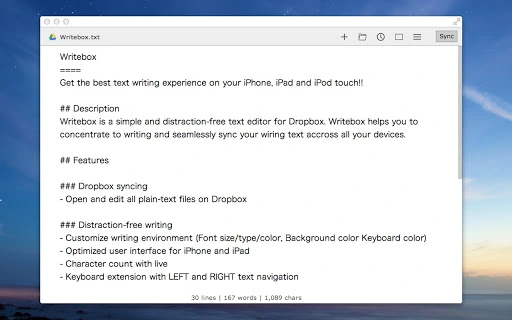
The user interface of Writebox is intentionally minimal, prioritizing readability and ease of use. The layout consists of a central text area with a clean toolbar at the top, offering quick access to formatting and file management options. Navigation is straightforward, relying on standard keyboard shortcuts and a simple menu system, which reduces the learning curve for new users.
Workflow efficiency is enhanced by the app’s automatic save function and real-time sync behavior. Users can begin writing immediately without configuring settings, and the software handles document persistence behind the scenes. The developer did not specify resource usage details, but based on its 10 MB size and Chrome Apps architecture, it is expected to operate smoothly on systems with moderate specifications.
Stability appears to be a strength, as Chrome Apps are generally well-integrated with their host operating systems. However, exact performance data was not provided. General software behavior patterns suggest responsive interactions and low latency during text input and document loading.
Compatibility & System Requirements
Writebox is compatible with both Windows and Mac operating systems, as stated by the developer. The software version is 1.0, with a file size of 10 MB, indicating a compact and efficient installation package. This small footprint makes it accessible even on devices with limited storage capacity.
Exact system requirements were not listed. Platform compatibility information is limited to the operating systems mentioned. Users should ensure their device supports Chrome Apps, as this framework is required for the application to function. The developer did not provide additional system requirements, so installation may depend on the presence of a compatible Chrome environment.
Pros and Cons
Pros
- Lightweight and fast-loading application
- Distraction-free writing environment
- Seamless cloud synchronization across devices
- Offline writing capability
- Free to download and use
Cons
- No advanced formatting or collaboration tools
- Dependent on Chrome Apps framework
- Limited customization options
- May not support future Chrome App deprecation
- Basic feature set may not suit advanced users
FAQ Section
Is Writebox available for Windows and Mac?
Yes, Writebox is compatible with both Windows and Mac operating systems, as confirmed by the developer.
Is the software free to use?
Yes, Writebox is available at no cost. The developer has not indicated any premium tiers or in-app purchases.
Can I use Writebox offline?
Yes, the application supports offline writing. Documents can be created and edited without an internet connection, with changes syncing once connectivity is restored.
Does Writebox require a Chrome account?
Yes, since Writebox is a Chrome App, it requires a Google account to sign in and enable cloud synchronization features.
Is the software secure?
As a Chrome App, Writebox leverages the security model of the Chrome browser. User data is stored locally and in the cloud through encrypted channels, though specific security protocols were not detailed by the developer.
Final Thoughts + CTA
Writebox delivers a focused, efficient writing experience tailored for individuals who value simplicity and concentration. Its lightweight design, cloud sync, and offline functionality make it a solid choice for casual and professional writers alike. While it lacks advanced features, its core purpose is well-executed, offering a reliable tool for drafting and organizing written content without unnecessary complexity.
For users seeking a free, no-frills writing environment that runs smoothly on both Windows and Mac, Writebox stands out as a practical solution. It’s particularly beneficial for those already invested in the Chrome ecosystem. Despite its limitations, the software provides consistent performance and a clean user experience.
Download Writebox now







